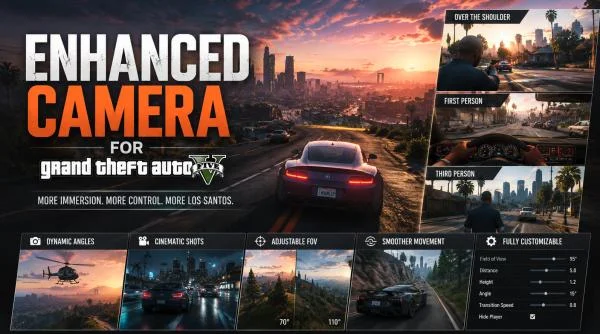
Enhanced Camera is a complete overhaul of the camera system in Grand Theft Auto V, giving you unprecedented control over first‑person and third‑person views. Whether you are on foot, behind the wheel, aiming down sights, or watching a cutscene, this mod puts the power in your hands. No gimmicks, no paywalls just pure, customizable camera freedom. Developed by DonDonny (hanks905), this mod is continuously updated. The latest version 2.0.0 fixes keyboard menu spam, adds per‑camera toggles, improves third‑person collision detection, and introduces a global mod toggle (F3). It is compatible with both Legacy and Enhanced versions of GTA V.
Enhanced Camera v2.0.0 for Grand Theft Auto 5
2.0.0
FREE DOWNLOAD
DIRECT LINK
Mod Info
- GameGrand Theft Auto 5
- Mod version2.0.0
- AuthorDonDonny, hanks905
- File size251 KB
- Released2026
About This Mod
Features
Menu & Controls (Press F7 in game)
-
Clean, responsive in‑game menu with real‑time adjustments
-
Modify camera position, field of view (FOV), crosshair size, thickness, and transparency
-
Toggle scope view and special camera modes
-
Adjust smoothing, offsets, and vehicle‑specific settings
-
All changes apply instantly – no restart required
-
Full keyboard and controller support
Weapon Camera Controls
-
Custom aim positioning
-
Adjustable crosshair size, thickness, transparency
-
Scope toggle system
-
Dynamic red‑on‑ped detection
-
Clean reticle behavior in vehicles and on foot
-
Per‑weapon offset saving – different weapon types remember their own placement
Vehicle Camera Controls
-
Fully customizable vehicle FOV
-
Smooth rotation tuning
-
Adjustable camera offsets
-
Free‑orbit tuning
-
Natural transitions between driving and riding states
-
Each vehicle can be saved individually – settings are stored in the INI and loaded automatically when you enter that vehicle
On‑Foot Camera Controls
-
Adjustable head position
-
Arm positioning refinements
-
FOV control
-
Rotation smoothing for cinematic movement
-
True immersion without the default wrist‑zoom effect
Third‑Person Improvements (v2.0.0)
-
Added hard‑stop collision for on‑foot camera against walls and objects
-
Added ceiling avoidance for on‑foot camera
-
Added hard‑stop collision for vehicle camera against walls and objects
-
Added ceiling avoidance for vehicle camera
-
Vehicle collision now ignores the player‘s own vehicle
Cutscene Camera Controls
-
Seamless integration during scripted events (lap dances, robberies, etc.)
-
Custom camera logic applied consistently
-
No snapping or broken transitions
Other Enhancements
-
Global mod toggle on F3 – quickly enable/disable the mod for compatibility
-
Camera Switch Popups ON/OFF toggle
-
INI support for all new toggles and settings
-
Fixed keyboard menu spam for Up/Down/Enter/Back keys (Left/Right remain fast for slider tuning)
Changelog
UPDATE VERSION 2.0.0
- Fixed keyboard menu spam/glitching for Up / Down / Enter / Back
- Kept Left / Right fast for slider tuning
- Added CAMERAS ON/OFF submenu
- Added per-camera toggles for 1P, 3P, vehicle, aim, and scene cam
- Added global mod toggle on F3
- Added Camera Switch Popups ON/OFF toggle
- Added INI support for new toggles
- Fixed 3P horizontal X sliders so shoulder side no longer blocks them
- Added 3P on-foot wall/object hard-stop collision
- Added 3P on-foot ceiling avoidance
- Added 3P vehicle wall/object hard-stop collision
- Added 3P vehicle ceiling avoidance
- Vehicle collision ignores the player’s own vehicle
Screenshots


Video
How to Install This Mod
Enhanced Camera works alongside Dynamic Vehicle First Person Camera. To use both:
-
Turn off
First Person VehicleandVehicle Aimingin the Enhanced Camera toggle menu.
The mod does not control story cutscenes – only interactive scenes like lap dances and robberies.
-
ScriptHookV – install the correct version for your GTA V version.
-
ScriptHookVDotNetEnhanced – absolutely required; works on both Legacy and Enhanced versions.
-
Locate your GTA V root folder (e.g.,
C:\Program Files (x86)\Steam\steamapps\common\Grand Theft Auto V). -
Open (or create) the
scriptsfolder inside the GTA V directory. -
Place the downloaded
.dllfile into thescriptsfolder. -
Launch GTA V (Story Mode). The mod loads automatically and generates an
inifile in thescriptsfolder.
Note: If you mess up the INI file, simply delete it and restart the game – defaults will be restored.
Direct linkENHANCED_CAMERA_v20.zip
PIXELDRAIN Download: ENHANCED_CAMERA_v20.zip[ 251 KB ]
DIRECT LINK2 Download: ENHANCED_CAMERA_v20.zip[ 251 KB ]
Helpful Guides
Mod Update History
- Enhanced Camera → v2.0.0 [ 13.06.2026 ]


Comments 0